

A report is only useful if a reader can trust it. Condition does three things for that: it keeps the time each photograph was taken, it locks a visit once a counterparty has signed it, and it prints a hash on the report cover so a copy can be checked against the original. None of them needs anything from you, but it helps to know what they mean.
Capture times
When you take a photograph, Condition reads the time, the time-zone offset and, if your camera recorded one, the location from the photograph's own metadata, and stores them with the photograph. They are read once and never changed, and the caption under every photograph in the report prints the capture time.
Tap a photograph to see where its time came from:
- "From the camera's metadata": the normal case for a photo taken in the app.
- "Device clock at capture": the camera gave no metadata, so the time is the moment the photo arrived, within seconds of the shutter.
- "No capture time": a photo from your library with no time in it. It is flagged in its caption and in a note on the report cover, so a reader knows that one photograph cannot be dated.
Condition does not use your device's location services. A location is stored only if your camera app put one in the photograph.
Locked visits
The first counterparty signature locks the visit. A green bar at the top says "Signed and locked" with the date, and the visit is read-only: no grade, photograph, description or element can change, on this device or any other it syncs to. Corrections go in a new visit, which is the point: the locked record is the one both parties agreed to.
A visit is also frozen, for a different reason, while a later visit compares against it. The bar then says so and names the later visit. Record the change there, or delete the comparison to unfreeze the earlier record. See Before you start a comparison.
The visit id and the report hash
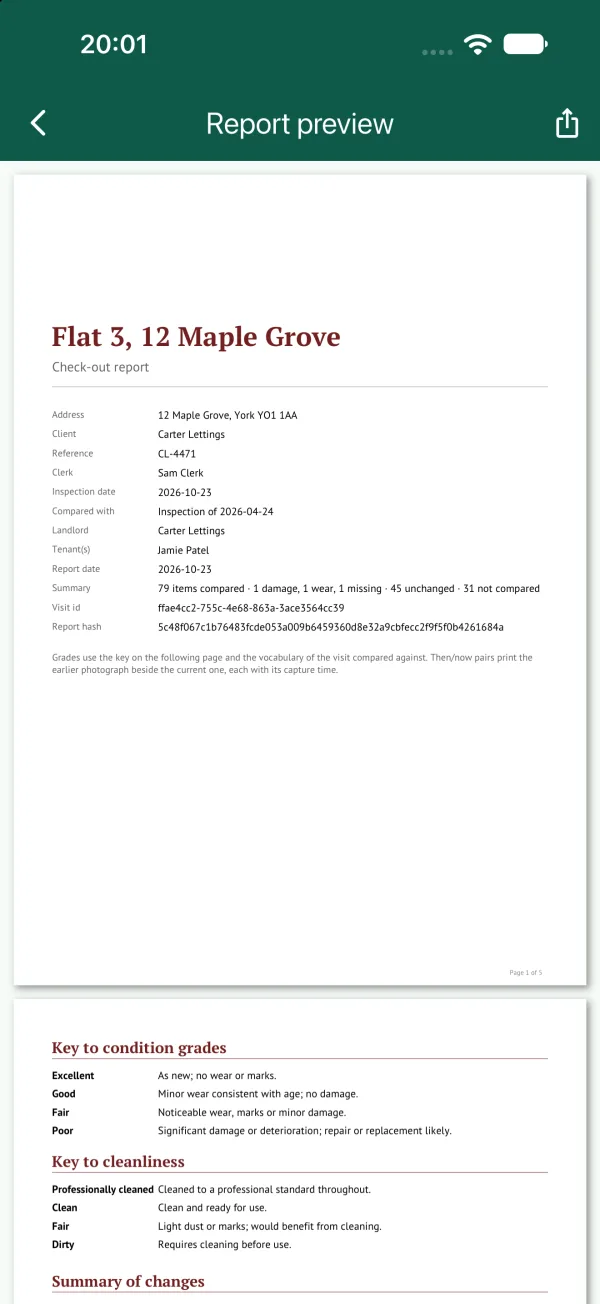
Every report cover prints two things: the visit id, which names the record the report came from, and the report hash, a SHA-256 of the report body (every page after the cover, photographs included). Anyone holding a copy of the PDF can recompute the hash and compare it with the one printed on the cover. If the copy has been altered, the hashes no longer match.
To check a copy, open the signing-link page at boluga.com/condition/link/ and use its Check a PDF tool. It says whether the file is intact and whether it belongs to the visit named on the cover.
A locked visit produces exactly the same PDF every time it is exported, so a copy made next year matches a copy made today. The cover's report date for a locked visit is the date it was locked, not the date of the export.
Activity
For a property that syncs to an account, the server keeps a trail of who changed what and when, stamped with the server's clock. Choose Activity from the walk's menu to read it. A counterparty signing through a link appears there under the name on the link. A property that lives only on your device has no trail; it does not need one, because nobody else can touch it.