

Breaks are the usual reason an hours app disagrees with a payslip, so Clock Card is explicit about them: every break is either paid or unpaid, and unpaid time comes off before anything is priced.
Breaks while clocked in
- Tap Break on the running card. The card shows when the break started and the worked time stops counting.
- Tap Resume when you are back.
A break taken this way is unpaid, which is what most hourly workers need. If yours are paid, open the shift afterwards and switch the break to paid (below). You can take as many breaks in a shift as you like.
Breaks by length
If you did not time a break, add it afterwards:
- Open the shift from the timesheet, or from Edit start time or notes while it runs.
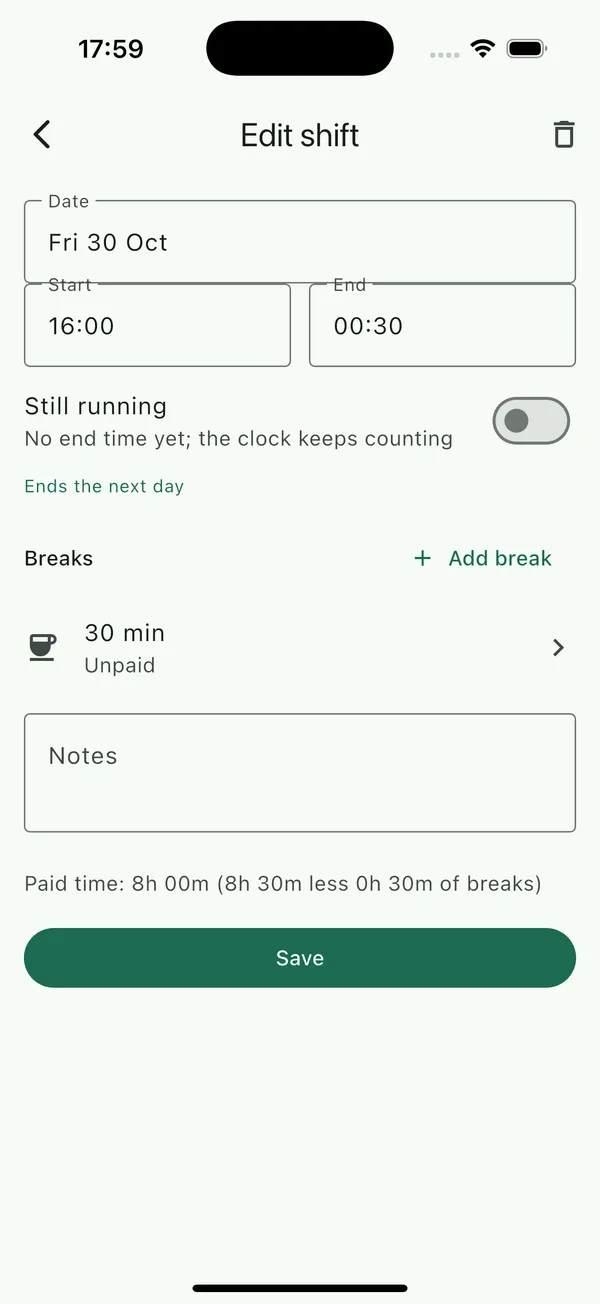
- Under Breaks, tap Add break.
- Choose Duration and type the minutes, for example 30, or Start & end to give exact times.
- Tap Done, then Save.
Paid and unpaid breaks
Each break has a Paid break switch, described as "Counts as worked time". Off (the default) means the break's minutes are taken off the shift before pay is worked out. On means the break is paid like any other minute and the shift's paid time does not change. The editor shows Paid time for the shift as you edit, so you can see the effect before saving.
Overnight shifts
A shift that starts on one day and ends after midnight is one shift. Clock in in the evening and out in the morning, or enter the start and end in the editor; the end date moves to the next day on its own. The shift is listed, and its overtime rules applied, on the day it started.
If your employer counts hours per calendar day, turn on Split overnight shifts at midnight under Settings › Time. The hours before midnight then count on the first day and the hours after it on the second, for daily overtime and for the timesheet's day totals. The shift itself stays one entry.
Split shifts
Two stints on the same day, for example a lunch service and a dinner service, are simply two shifts. Clock in and out twice, or add two past shifts. Daily overtime adds the day's shifts together before applying its threshold.
Clock changes
Shifts are stored as exact moments in time with the time zone they were worked in, so a shift across the night the clocks change is paid for the hours actually worked: nine hours when the clocks go back, seven when they go forward. Travelling to another time zone does not alter shifts already logged.